
Planned · not available yet
Ask in Claude or ChatGPT. Get the finished email.
Caliber Email will connect to Claude and ChatGPT through an MCP server. Ask for an email in the chat, and Caliber will write it in your voice from your own rules, build it from your own blocks and put it in your ESP as a draft for a named person to sign off. It isn’t available yet.
Integrations: Klaviyo · Braze · Salesforce MC Next · Voyado · Customer.io · Iterable
01 / What you’ll ask
What will you be able to ask for?
You will be able to ask for the work the way you would ask a colleague, in the chat you already use. Caliber does the work under your brand’s rules, and the answer comes back with a link to open it in Caliber.
-

“Write the Guji launch email for Denmark, from this brief.”
Caliber will write it in your voice, from your rules, and build it from your blocks with the legal line in place. If the brief is missing something, it will ask.
caliber_create_email
-

“Shorten the hero copy, and use the notes from review.”
You will get a proposal with the changes word by word. Nothing changes until you apply it.
caliber_revise_email · caliber_apply_proposal
-

“What is waiting for me in Caliber this week?”
Sign-off requests, emails sent back with notes, and emails due soon, each with its link.
caliber_list_reviews
-

“Ask the Head of E-commerce to sign this off.”
The request goes to that person in Caliber. The assistant can ask for a sign-off; it can never give one.
caliber_request_signoff
-

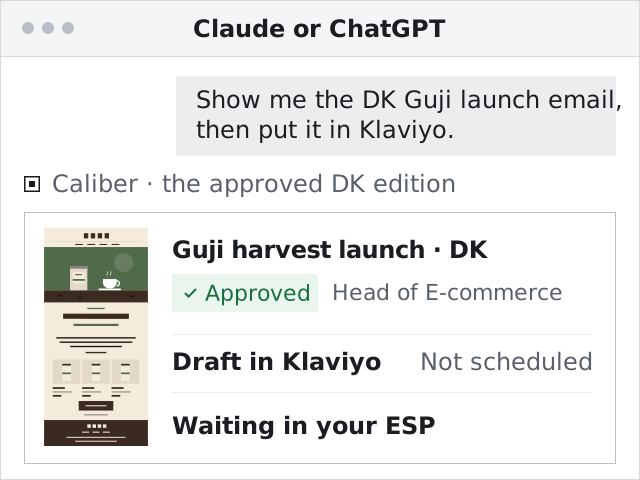
“Put the approved email in Klaviyo as a draft.”
You see the plan first: which editions, which audience, any duplicates. Then each edition becomes a draft in your ESP. Nothing is scheduled.
caliber_plan_export · caliber_export_to_esp
-

“How does the agency’s Black Week email score against our brand?”
Emails Caliber didn’t write can be scored too, with the reason for each dimension and the top three fixes.
caliber_score_content
02 / How it works
What happens between your question and the draft?
The assistant is only the way in. The email goes through the same brand, the same blocks, the same sign-off and the same export as an email your team starts in Caliber.

-
You ask, in your own words.
In Claude or ChatGPT, with the brief in the chat or a link to it.
-
Written and built in Caliber.
Caliber will write the copy in your voice, from your own rules, and build the email from your own blocks with your legal lines in place.
-
Signed off by a named person.
A named person approves it in Caliber, with a score that shows its work.
-
A draft in your ESP.
Each edition will go to your ESP as a draft.
03 / What stays a person’s
What will an assistant never do?
An assistant will never approve or delete anything in Caliber. Those tools don’t exist for it, and the database refuses a deletion from an assistant even if one were asked for.
- Approve an email
- Delete anything
- Publish a new version of your brand guide
- Touch your ESP keys or connections
- Invite people or make share links
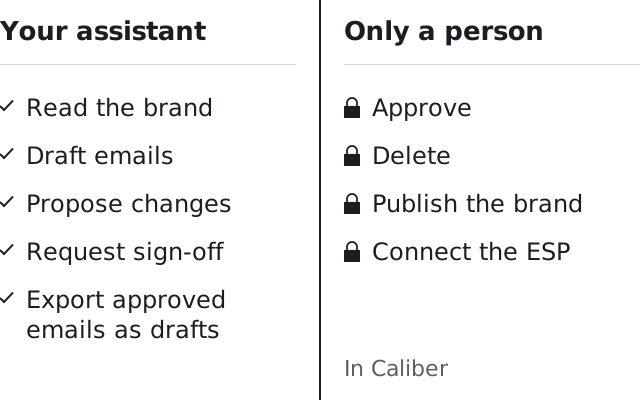
An assistant can ask a named person for sign-off. Only that person can give it, in Caliber.
Want it in Claude or ChatGPT? Say which when you sign up. Early access opens to small groups in turn.
Get early access04 / Who decides
Who decides what an assistant can reach?
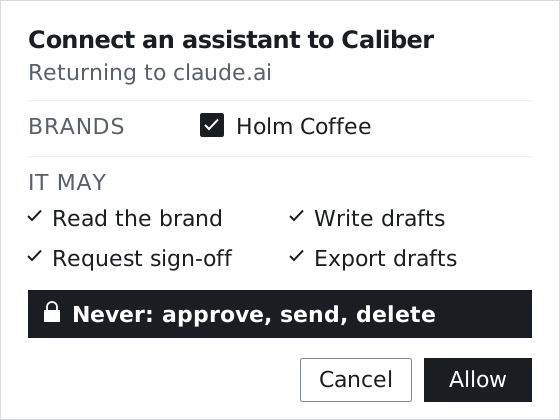
The person connecting it will. On Caliber’s own consent screen they pick which brands it may use and what it may do there, and an account admin decides whether assistants can connect at all.
Your brands, your choice of access.
Read-only lets an assistant read the brand and score emails. Full adds writing drafts, requesting sign-off and exporting drafts. “All brands” is never ticked for you.
The screen also shows where the connection really comes from, so a look-alike request stands out.
-
Your own login.
Each person connects with their own Caliber sign-in, through OAuth. There is no API key to paste or share.
-

Your current role, on every call.
Every request will be tested again: the connection, the brand, your membership and your role today. Lose access in Caliber, and the assistant loses it too.
-
Revoke it at any time.
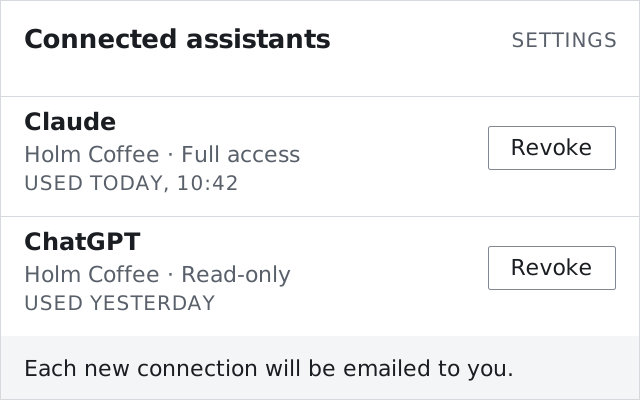
Every connection is listed on Caliber’s Connected assistants page, with its last use. One click ends it. Connections also end on a password change and after 90 days.
-

An email for every new connection.
It says which assistant, which brands and which access, with a link to revoke it.
05 / What leaves Caliber
What leaves Caliber, and what never does?
An assistant will see what it needs to talk about your email: the copy, the score, the state and the links. What makes your brand work in Caliber stays in Caliber.
-
Unapproved emails stay in Caliber.
The full email preview will appear in the chat only for a signed-off edition. A draft shows as text, with “Open in Caliber”. Unapproved email HTML never reaches Anthropic’s or OpenAI’s host.
-
Caliber’s prompts stay in Caliber.
An assistant gets your voice, your words, your legal lines and the score’s dimensions. Never Caliber’s prompts, rubric anchors or calibration examples.
-
Reviewer notes stay out by default.
Text people typed or pasted, like reviewer notes and imported emails, is left out until an account admin chooses otherwise.
-
Links from your own sites only.
When an assistant puts a link in a brief, Caliber will open it only if it is on your brand’s own domains.
-
A daily limit per connection.
One connection can’t use up the brand’s included AI usage. Your team’s own work is unaffected.
-
On the record.
Every change an assistant makes is recorded as made through it, with the person and the connection.
| What it may do | Access | Tools | Never |
|---|---|---|---|
| Read the brand | Read-only | caliber_list_brands, caliber_get_brand_guide, caliber_find_work, caliber_get_email, caliber_show_email, caliber_list_reviews, caliber_audit_library, caliber_get_status |
Changes nothing |
| Score emails | Read-only | caliber_check_content, caliber_score_content, caliber_fix_content |
For any email, Caliber’s or not; never writes to the ESP |
| Write drafts | Full | caliber_create_email, caliber_add_markets, caliber_revise_email, caliber_apply_proposal, caliber_write_copy |
A proposal changes nothing until it is applied |
| Request sign-off | Full | caliber_request_signoff, caliber_add_comment |
Asks; never approves |
| Export drafts | Full | caliber_plan_export, caliber_export_to_esp |
A draft in your ESP |
06 / Where it works
Which assistants will it work in?
Claude and ChatGPT, first as a custom connection your team adds with Caliber’s server address. Listings in their directories will come later.
Claude
On the web, desktop and mobile, and in Claude Code. Custom connectors work on every Claude plan; on Team and Enterprise an Owner adds it, then each member connects with their own login.
ChatGPT
On Business, Enterprise and Edu workspaces, where an admin adds it for the workspace. On ChatGPT Pro, OpenAI allows the read tools only.
Directories, later
A custom connection comes first. Listings in Claude’s and ChatGPT’s directories will follow.
Beside your ESP’s own
Klaviyo, for one, has its own MCP server. An assistant can hold both: Caliber for the finished email, your ESP’s server for what lives in your ESP.
Access from Claude and ChatGPT will be included on every tier. What an assistant asks Caliber to write counts against the tier’s included AI usage and its hard cap, like your team’s own work. List prices are shared on the walkthrough.
How pricing worksWhere Caliber stands
Finished emails. In your brand. In your ESP.
- Stage
- Caliber Email is pre-launch, and early access opens to small groups in turn.
- Claude and ChatGPT
- Planned, through Caliber’s own MCP server. Not available yet, and not listed in any directory.
- Integrations
-
- Klaviyo
- Braze
- Salesforce Marketing Cloud Next
- Voyado
- Customer.io
- Iterable
- Sign-off
- In each of them, a named person signs off.
07 / Questions
Questions
Can an assistant put an unapproved email in our ESP?
Not when your brand requires sign-off, which will be the default for a new brand: then only a signed-off edition goes to the ESP, and one edited after its sign-off is refused. The export goes through the same guard as a person’s, and it always arrives as a draft.
Is an email written this way on brand, or another first draft?
Caliber writes it, not the assistant. Caliber uses AI as the method: it will write the copy in your voice, from your own rules, and build the email from your approved blocks with your legal lines in place. Words your brand never uses never reach the draft. Each email comes with a score that shows its work.
We already use Klaviyo’s MCP server. Does Caliber replace it?
No. Klaviyo’s server reaches what lives in Klaviyo; Caliber’s will reach your brand in Caliber and put finished emails into Klaviyo as drafts. Every Caliber tool is named caliber_, so an assistant can tell the two apart and use both.
How do we turn it off?
Assistant access will be off until an account admin switches it on. Any member can end their own connection on the Connected assistants page, and brand owners will see every connection that names their brand there.
When will it be available?
Not yet. Caliber Email is pre-launch, and access from Claude and ChatGPT comes after the core product. Early access opens to small groups in turn; tell us when you sign up if your team works in Claude or ChatGPT.
Bring a real brief.
Early access opens to small groups in turn. Tell us which ESP you send from, and whether your team works in Claude or ChatGPT.