
Finished emails, ready for Voyado.
Caliber Email integrates with Voyado, as it does with Braze and Klaviyo. Approve a brief, and Caliber will write the email in your voice, from your own rules, and build it from your own blocks with your legal lines in place, ready to place in Design Studio. A named person signs it off.
Integrations: Klaviyo · Braze · Salesforce MC Next · Voyado · Customer.io · Iterable
01 / The hand-over
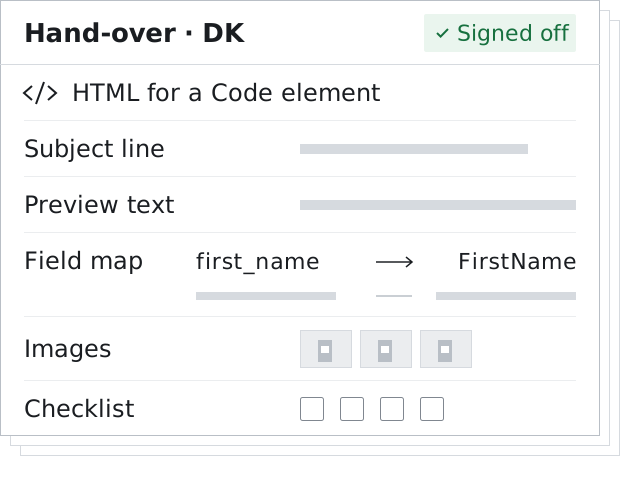
What will Caliber hand over to Voyado?
The finished email, ready to place in Design Studio. As far as Voyado’s developer documentation shows, there is no public API for creating a Design Studio email, so Caliber will not create the email inside Voyado.
-
HTML for a Code element
The email’s HTML, for a Code element in Design Studio.
-
Subject line
-
Preview text
-
Field map
A map from each personalisation field to its Voyado field.
-
Images
The list of images.
-
Checklist
A short checklist of what your team does next.
The checklist is short because the email is done.
Your team creates the sendout, chooses the marketing group, places the HTML, inserts the personalised unsubscribe field, sends a Test Mail and publishes. What is published is what sends [1].
02 / Marketing groups
Marketing groups and synced modules
Voyado organises markets as marketing groups, and Design Studio builds one base email with a variant for each group [2][3].
Caliber will match that shape: one approved brief, one edition per marketing group, each written for its market rather than translated from the base.
Footers usually live in synced modules, and a saved change to a synced module reaches every email that uses it, except those already sent [4]. That is the right place for a shared footer and a risky one for a legal line. Caliber will put each market’s own legal line in place in its edition before the hand-over, and hold any edition whose line counsel hasn’t approved, so a line approved for Denmark is never the one a Swedish edition carries.
03 / Bonnie
Bonnie, and where Caliber fits
The two can sit side by side in one team.
Bonnie is Voyado’s assistant. On Voyado’s Extended AI add-on it translates Design Studio variants from the base message for each marketing group, and Voyado lists the feature as generally available in Design Studio from 2 Sep 2026 [5].
For a team whose markets differ only in language, that is a quick way to fill in the variants.
Caliber starts somewhere else: from the approved brief, written in your brand’s voice for each market, built from your own blocks with its legal line in place, with a score that shows its work, and signed off by a named person per market.
What Caliber hands over is the email your approver already signed.
See your brief ready for Voyado. Early access opens to small groups in turn.
Get early access04 / One brief
What one brief looks like for Voyado
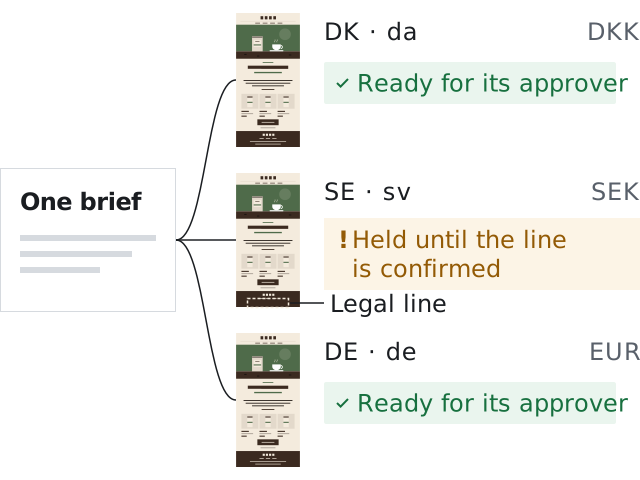
Holm Coffee is a fictional demo brand. Its fixture sends from Klaviyo, so this is a thought experiment: if Holm Coffee sent from Voyado, with marketing groups for Denmark, Sweden and Germany, one approved autumn brief would become three hand-overs.
Each would carry its own language, currency and legal line, the German one with the Impressum link the Danish base does not need, and each would name the approver who signed it off.
A brand that sends in one market gets one hand-over. For marketing groups, inheritance and Bonnie’s settings in detail, read how Voyado handles several languages; for the case for one brief per market, one brief, every market finished.
Caliber and Voyado
Finished emails. In your brand. In your ESP.
- Voyado
- Caliber Email integrates with Voyado. It will turn one approved brief into a finished email for each market, written in your voice and built from your blocks, ready for your team to place in Design Studio after a named person signs it off.
- Also integrates with
-
- Klaviyo
- Braze
- Salesforce Marketing Cloud Next
- Customer.io
- Iterable
05 / Questions
Questions
Why a hand-over and not a draft straight in Voyado?
Because Caliber only claims what an ESP’s public API allows. Where an ESP lets Caliber create a draft, as Klaviyo and Braze do, Caliber will. In Voyado it will hand over the finished email instead, with nothing left to write.
Can we keep using Bonnie?
Yes. Caliber will change nothing in your Voyado settings, your Language and tone rules or your glossary.
Will Caliber touch our synced modules?
No. Synced modules stay yours to edit. Caliber will put each market’s own legal line in place in its email before it hands the email over.
Sources
- Voyado Help Center, “Manual sendouts”, updated 7 Oct 2026. https://help.engage.voyado.com/hc/en-gb/articles/19111662074268-Manual-sendouts (checked 1 Nov 2026)
- Voyado Help Center, “Introduction to marketing groups”, updated 6 Oct 2026. https://help.engage.voyado.com/hc/en-gb/articles/19093164265500-Introduction-to-marketing-groups (checked 1 Nov 2026)
- Voyado Help Center, “Localization in Design Studio”, updated 9 Jul 2026. https://help.engage.voyado.com/hc/en-gb/articles/28354672424092-Localization-in-Design-Studio (checked 1 Nov 2026)
- Voyado Help Center, “Working with modules”, updated 8 Oct 2026. https://help.engage.voyado.com/hc/en-gb/articles/19241141723548-Working-with-modules (checked 1 Nov 2026)
- Voyado Help Center, “Product updates in 2026”, updated 27 Oct 2026. https://help.engage.voyado.com/hc/en-gb/articles/24827169322140-Product-updates-in-2026 (checked 1 Nov 2026)
See your brief ready for Voyado.
Join early access, and bring a real brief to your walkthrough.